Basic Guide for SEO Beginners: Step-by-Step Tips to Improve Your Rankings

If you’re new to digital marketing or just launched your website, you’ve likely heard of SEO. So, what exactly is SEO, and why is it such a crucial part of online success? This basic guide for SEO beginners will walk you through the essentials, breaking down what SEO is, why it’s important, and how to start optimizing your site step by step to improve your search engine rankings.


🌐 What is SEO?
basic guide for seo beginners

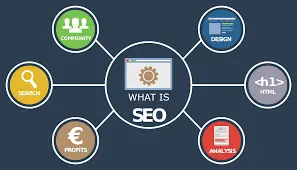
SEO (Search Engine Optimization) is the process of optimizing your website to rank higher in search engine results pages (SERPs), like Google. The higher your site ranks, the more visibility and organic (unpaid) traffic you receive.

In simple terms, SEO helps your target audience find you online when they search for topics related to your business or content.


🚀 Why is SEO Important?


🛠️ Step-by-Step SEO Tips for Beginners

Do Keyword Research

Keyword research is the foundation of any successful SEO strategy—it helps you understand what your target audience is actively searching for online.
Before creating content, take time to discover the exact terms and phrases your potential visitors are using. This allows you to align your content with their search intent and increase the chances of your pages being found in search results.

Start by using free and beginner-friendly keyword research tools such as:

  • Google Keyword Planner: A powerful tool that shows search volume, competition level, and keyword ideas based on your niche or website.

  • Ubersuggest: Great for generating keyword ideas, analyzing competitor keywords, and identifying long-tail variations.

  • AnswerThePublic: Visualizes commonly asked questions and search phrases based on your main topic—helping you tap into what people are really curious about.

Focus on long-tail keywords—these are specific phrases that typically contain three or more words, such as “best digital marketing tools for small businesses.” While they may have lower search volume compared to broad keywords, they tend to be less competitive and more targeted. This gives you a higher chance of ranking on search engines and attracting visitors who are further along in their decision-making process.

By targeting long-tail keywords and understanding search behavior, you can create content that truly resonates with your audience and stands out in search results.

Optimize Your On-Page SEO

To improve your on-page SEO and help your content rank higher in search engines, focus on optimizing key elements of each page. These components not only help Google understand your content but also enhance user experience and click-through rates.

  • Title Tags: Your page title is one of the most important SEO elements. Include your primary keyword naturally and make sure the title accurately reflects the content. A well-crafted title improves visibility in search results and encourages users to click.

  • Meta Descriptions: This short snippet appears below your title in search results. Write a clear, compelling summary that entices users to visit your page. While it doesn’t directly impact rankings, a strong meta description can significantly improve your click-through rate.

  • Headers (H1, H2, H3): Organize your content using proper heading tags. Use one H1 tag for the main title, then break content into sections using H2 and H3 tags. This helps readers skim your content easily and allows search engines to better understand the structure and relevance of your information.

  • Content Quality: Prioritize creating original, informative, and valuable content that directly addresses user intent. Avoid duplicate content and aim to provide unique insights or solutions that set your page apart from competitors.

  • Image Alt Text: Every image on your site should include descriptive alt text. This not only improves accessibility for users with visual impairments but also helps search engines understand the content of your images, which can contribute to image search visibility.

  • URL Structure: Keep your URLs short, descriptive, and keyword-rich. Avoid unnecessary words or numbers. A clean URL like yourdomain.com/seo-basics is more user-friendly and SEO-friendly than yourdomain.com/page?id=12345.

By optimizing these elements on every page, you enhance both user experience and search engine readability—key factors in achieving and maintaining strong search rankings.

Create Quality Content Regularly

basic guide for seo beginners

Content is the foundation of effective SEO—it’s what attracts visitors, answers their questions, and builds trust with your audience.
Creating high-quality, relevant content helps search engines understand what your website is about and positions you as an authority in your field. A great way to start is by launching a blog where you consistently publish helpful articles. Focus on answering common questions in your industry and providing practical solutions to the challenges your audience faces. This not only improves your chances of ranking in search results but also keeps users coming back for more.

Tips for creating SEO-friendly content:

  • Write for people first: Your content should be easy to read, engaging, and genuinely helpful. While SEO is important, always prioritize the needs and interests of your audience.

  • Use keywords naturally: Incorporate relevant keywords throughout your content—especially in headings and key sections—but avoid overusing them, which can hurt readability and SEO performance.

  • Keep content fresh: Regularly update older posts with new information, improved formatting, and current data to maintain their value and ranking potential.

By combining user-focused writing with smart SEO practices, your content can drive organic traffic, establish your expertise, and support your overall digital marketing goals.

Improve Site Speed and Mobile Experience

Google prioritizes websites that offer a seamless user experience—especially those that load quickly and are optimized for mobile devices.
A slow or poorly responsive website can lead to high bounce rates and lower search rankings, as users are less likely to stay and engage with your content. To evaluate and enhance your site’s performance, use tools like Google PageSpeed Insights and GTmetrix. These tools analyze your site’s speed, highlight performance issues, and offer actionable suggestions for improvement.

To meet Google’s standards and keep visitors satisfied, ensure your website is mobile responsive, meaning it adjusts smoothly across all screen sizes and devices. Aim for fast loading times, ideally under 3 seconds, to keep users from abandoning your site. Additionally, prioritize easy navigation with clear menus, organized content, and intuitive layout. A fast, mobile-friendly website not only improves SEO but also enhances user satisfaction and conversion rates

Use Internal and External Links

Internal and external links play a crucial role in both user experience and SEO.
Internal links connect your current page to other relevant pages or blog posts within your own website. This not only helps guide visitors to related content—keeping them engaged longer—but also allows Google’s crawlers to navigate and index your site more efficiently, improving overall site structure and search rankings.

On the other hand, external links point to reputable, authoritative sources outside your website. By linking to trusted sources, you provide additional value to your readers and enhance the credibility of your content. Google sees this as a positive signal, showing that your information is well-researched and backed by reliable references. Combining both types of links effectively strengthens your site’s SEO and improves the overall user experience.

Start Building Backlinks

Backlinks—links from other websites pointing to yours—act as votes of confidence in the eyes of Google, signaling that your content is trustworthy, valuable, and authoritative.
The more high-quality backlinks your site earns, the more likely it is to rank higher in search engine results. For beginners, building backlinks doesn’t have to be complicated. Start by guest posting on reputable blogs within your niche, which not only earns you backlinks but also exposes your content to a wider audience.

Submit your website to trusted online directories to improve visibility and gain referral traffic. Share your content consistently on social media platforms to encourage others to link back to it. Finally, join relevant forums and online communities where you can provide helpful answers and share links naturally—building both relationships and backlinks in the process.

Submit Your Site to Google basic guide for seo beginners

Use Google Search Console to optimize your website’s visibility in search results.
Start by submitting your sitemap to help Google discover and index your pages more efficiently. Regularly monitor your site’s performance metrics, such as clicks, impressions, and average position, to gain valuable insights into how users find and interact with your site. Additionally, use the tool to identify and fix crawl errors that may prevent certain pages from being indexed. Addressing these issues ensures that Google can properly access, understand, and rank your content—boosting your site’s chances of appearing in relevant search results.

✅ Final Tips for SEO Beginners

Remain patient — SEO is a long-term approach that yields meaningful and lasting results over time.


📝Conclusion

This basic guide for SEO beginners is your starting point to mastering SEO. By applying these step-by-step tips, you’ll set your website up for long-term growth, higher rankings, and more organic traffic. Keep in mind, SEO isn’t a one-and-done task — it’s a continuous process that becomes more effective and rewarding with consistent effort.

Leave a Reply

Your email address will not be published. Required fields are marked *